Translation bundle
Installation
$ composer require enhavo/translation-bundle$ yarn add @enhavo/translation# assets/admin/container.di.yaml
imports:
- path: '@enhavo/translation/services/admin/*'Introduction
One of the main concepts of the translation bundle is that the translated model knows nothing about translation. Translation is an additional layer, making it easy to add or remove translation later on. Translation data is therefore stored in separate database tables with a reference to the original data. This bundle supports simple text translations as well as route and media translations.
The bundle uses the Enhavo\Bundle\FrameworkBundle\Locale\LocaleResolverInterface to decide which locale should be loaded.
Metadata
To make a property translatable, you need to add metadata to your entity. That can be done with YAML or PHP attributes. Both approaches can be combined. The YAML configuration and attributes are merged.
use Enhavo\Bundle\TranslationBundle\Attribute\Translate;

class Article
{
    #[Translate('text')]
    private ?string $title = null;

    #[Translate('text', ['html' => true])]
    private ?string $teaser = null;

    #[Translate('slug', ['allow_fallback' => true])]
    private ?string $slug = null;

    #[Translate('file')]
    private ?File $picture = null;

    #[Translate('model')]
    private Collection $content;

    #[Translate('route')]
    private ?Route $route = null;
}# config/packages/enhavo_translation.yaml
enhavo_translation:
metadata:
App\Entity\Article:
properties:
title:
type: text
teaser:
type: text
html: true
slug:
type: slug
allow_fallback: true
picture:
type: file
content:
type: model
route:
type: routeFor a full list of available types and their options, see the Translation Reference.
Form
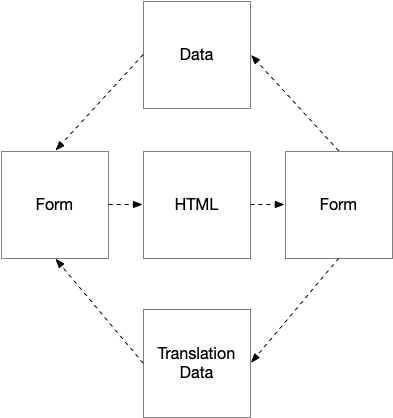
To allow users to edit translations within a form, the translation bundle uses form hooks and extensions to inject and overwrite additional form fields. After the form is submitted, the translation data is stored into a buffer and only saved to the database on the next Doctrine flush.
Access control
The hooks are only applied to forms that are configured in the access control. You can use access_control to restrict or allow specific routes using regex patterns.
# config/packages/enhavo_translation.yaml
enhavo_translation:
    form:
        default_access: true
        access_control:
            - '/^\/admin\/api\//'
If default_access is true, the patterns in access_control will exclude matching routes. If default_access is false, the patterns will include matching routes instead.
# only enable translation forms for specific routes
enhavo_translation:
    form:
        default_access: false
        access_control:
            - '/^\/admin\/api\/article/'
            - '/^\/admin\/api\/page/'
Serialization
On normalization and serialization with the Symfony serializer component, the translation data will automatically be applied. This means the output of the serializer is a fully translated object.
echo $article->title;
$normalizedData = $normalizer->normalize($article, [], [])
echo "\n";
echo $normalizedData['title'];
The output could look like this:
This is a test article
Das ist ein Test Artikel
Access control
The translation is only applied during serialization if the current route matches the access control configuration. You can use access_control to restrict or allow specific routes using regex patterns. This is equivalent to the access control described in the form section above.
# config/packages/enhavo_translation.yaml
enhavo_translation:
    translator:
        default_access: true
        access_control:
            - '/^\/api\//'
Routing
The translation bundle provides routing integration to generate locale-specific URLs for your entities. It consists of two parts: a route auto-generator that creates translated routes, and a route strategy that resolves the correct route based on the current locale.
Auto generator
The locale_prefix generator automatically creates routes with locale prefixes for each configured locale. For example, a page with the title "About us" would get routes like /en/about-us, /de/ueber-uns and /fr/a-propos.
# config/packages/enhavo_routing.yaml
enhavo_routing:
    classes:
        App\Entity\Page:
            generators:
                prefix:
                    type: locale_prefix
                    property: title
The property option defines which property is used to generate the URL slug.
Route strategy
To resolve the correct translated route when generating URLs, configure the translation_route strategy for your entity.
# config/packages/enhavo_routing.yaml
enhavo_routing:
    classes:
        App\Entity\Page:
            router:
                default:
                    type: translation_route
When a URL is generated for the entity, the strategy checks the current locale and returns the matching translated route. If no translation exists for the current locale, it falls back to the default route.
Metadata
Make sure the route property is marked as translatable in the translation metadata.
#[Translate('route')]
private ?Route $route = null;enhavo_translation:
metadata:
App\Entity\Page:
properties:
route:
type: routeAuto translation
Auto translation allows you to automatically translate your content using external translation services like DeepL or Claude. The system translates all properties that are marked as translatable and support auto-translation.
Clients
To enable auto translation, you need to configure at least one translation client. You can provide context to the translation client to improve translation quality. The context is passed along with each translation request.
# config/packages/enhavo_translation.yaml
enhavo_translation:
    translation_client:
        context:
            provider: Enhavo\Bundle\TranslationBundle\Client\ConfigContextProvider
            text: 'This is a website about cooking recipes. Use informal language.'
            files:
                - 'translations/context.txt'
        client: Enhavo\Bundle\TranslationBundle\Client\DeeplTranslationClient
        deepl:
            api_key: '%env(DEEPL_API_KEY)%'
            glossary_id: 'your-glossary-id'
        claude:
            api_key: '%env(CLAUDE_API_KEY)%'
            model: 'claude-haiku-4-5-20251001'
            timeout: 600
            max_tokens: 4096
        chain:
            clients:
                - Enhavo\Bundle\TranslationBundle\Client\ClaudeTranslationClient
                - Enhavo\Bundle\TranslationBundle\Client\UrlTranslationClient
        url:
            domains:
                - 'example.com'
Endpoint and Action
To allow users to trigger auto translation from the admin interface, you need to add a route with the translate_resource endpoint and a translate action to the input configuration.
# config/routes/admin_api/article.yaml
app_admin_api_article_translate_resource:
    path: /article/translate/resource
    defaults:
        _expose: admin_api
        _endpoint:
            type: translate_resource
resource: app.article# config/resources/article.yaml
enhavo_resource:
inputs:
enhavo_article.article:
actions:
translate:
type: translate
route: app_admin_api_article_translate_resourceThis adds a translate button to the resource form. When clicked, it saves the resource and translates all translatable properties into every configured locale.
Console command
You can also trigger auto translation from the command line.
bin/console translation:auto-translate <resource> <id> <locale>For example:
bin/console translation:auto-translate app.article 5 de